***IMPORTANT***
Follow the steps below to unlock stories:
Step 1: Go to the story page where the paywall is up (this page is 100% in the browsing history of your Chrome/Safari/etc.)
Step 2: Click "Login Here".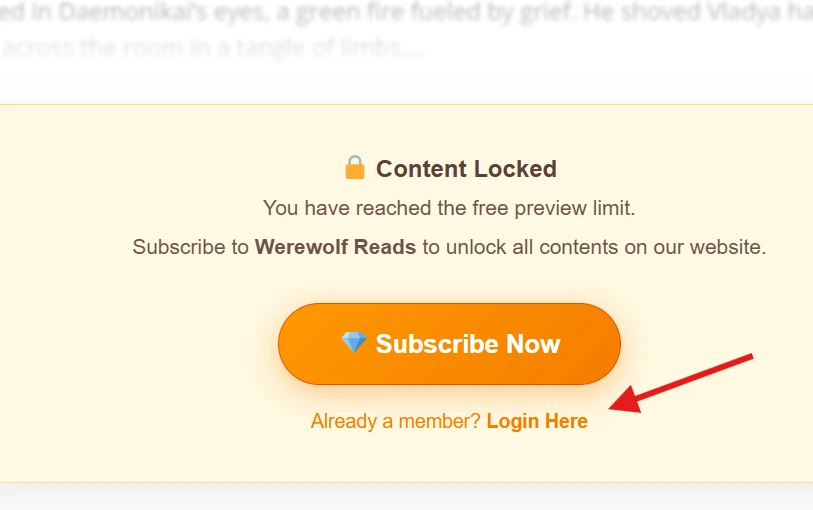
Step 3: In the login window:
- Username is your email adress
- The format of the default password is [werewolfreads plus your email address]
For example, if your email address is example123@gmail.com, then your username and default password would be:
- Username: example123@gmail.com
- Default password: werewolfreadsexample123@gmail.com
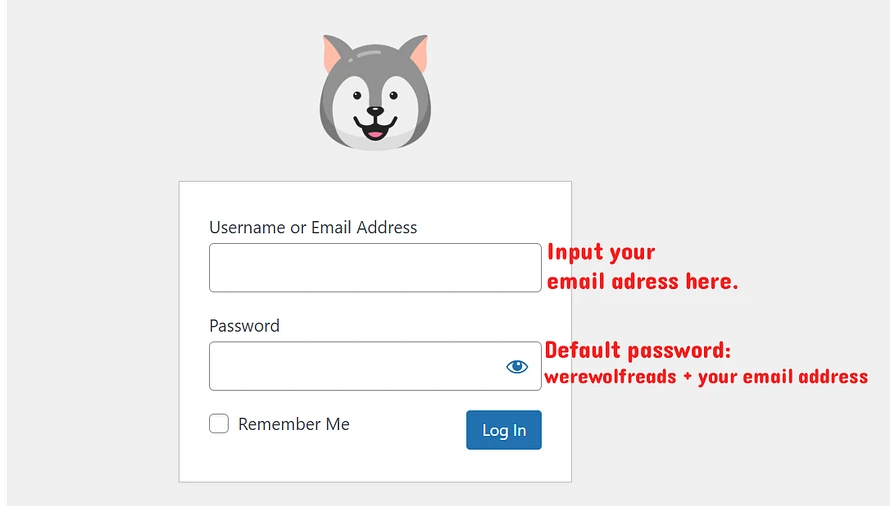
Note: Make sure all letters to input are lowercase. This is because the system has converted all letters in your email address to lowercase when recording it.
Step 4: Once logged in, you'll find the paywall gone instantly. You can now read without any hassle.
Step 5: (Optional) To change your default password, in the upper right corner of the page, click My icon > Edit Profile.
It is fine to use the default password to log in and read. But for long-term account security, please remember to change it to a more complex one later.
If you still cannot login and find the unlocked stories, feel free to send me a message on fourthwall or leave a comment on this post, I am always ready to help.
There do exist cases that the system malfunctions and it fails to create your account. No worries! Just leave us a message here, we will manually create a account for you as soon as possible. For most cases your account will be ok within 1 hour; 100% ok within 8 hours (just in case sleeptime).
Trust us, even though we are small team, we are not spam.